
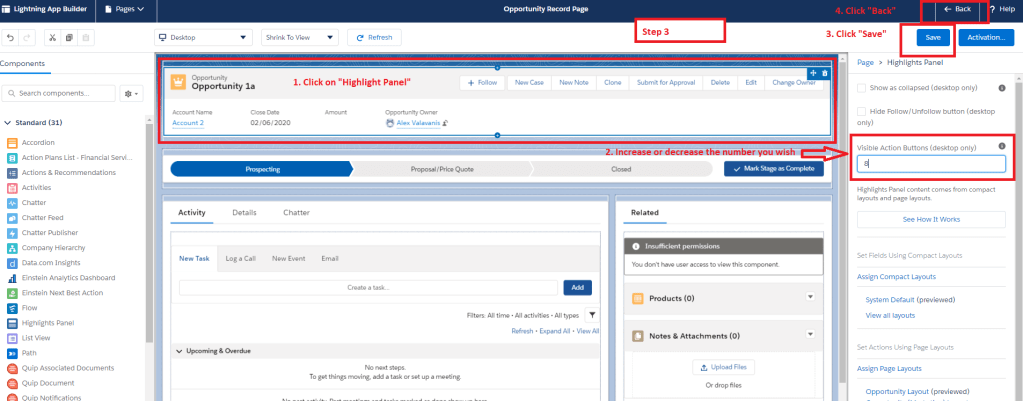
With “Visible Action Buttons” setting in Lightning App Builder , Salesforce Administrators can modify the number of Actions that show on the page. There are 2 points you will need to consider though:
- This functionality is only supported on the desktop version in Salesforce
- The maximum number of Action buttons is 10.
Follow my steps.
Step 1: Click a record from an object (e.g. Opportunities)

Step 2: Click “Edit Page”

Step 3: Click on “Highlights Panel” and add (or decrease) the number of “Visible Action Buttons”. Once done, click anywhere outside the box and then click on “Save”
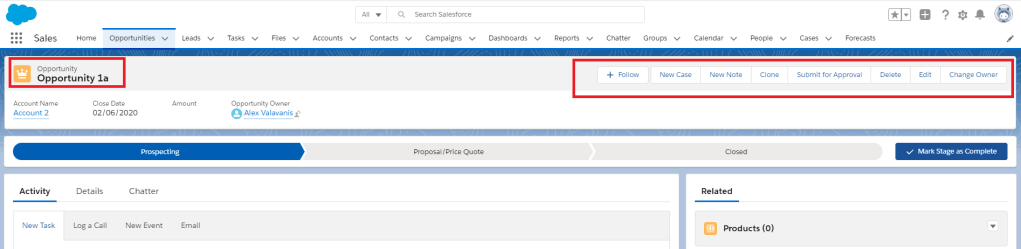
Step 4: Done!
 Cloud Mantras